
Free vs Paid Floor Plan Apps: Which One Actually Saves You Time?
Free floor plan apps sound like a straightforward win. Why pay for something you can get for nothing? But for real estate agents and photographers who rely on floor plans for client-facing listings, the “free” label often hides significant trade-offs: watermarked exports, limited projects, restricted features and hours of manual formatting that eat into billable time. This guide breaks down what free floor plan software actually delivers, what you give up, and at what point a paid tool or pay-per-plan service starts saving you money.
Key Takeaways
- Free floor plan apps are useful for testing and personal projects, but most restrict export quality, limit project counts and lack professional features like custom branding.
- The real cost of “free” is your time. Manually measuring, drawing, formatting and exporting a plan is the slowest way to produce one.
- Roomio scans a 4 bedroom home in under 5 minutes and delivers a professionally drafted floor plan within 12 to 24 hours, so your active time per property stays low.
- Your first Roomio floor plan is free. The app and scanning cost nothing, and you only pay when you order a plan.
- Subscription tools can make sense at high, consistent volume, but you pay every month whether you produce plans or not.
What “Free” Actually Means in Floor Plan Apps
No floor plan app is truly free without limitations. Every free tier exists for one reason: to get you using the product so you eventually upgrade. Understanding how each app restricts its free offering helps you decide whether those restrictions are deal-breakers for your workflow.
There are three common models. The first is a project-limited free tier, where you get full features but can only create a small number of plans before you must pay. The second is a feature-restricted free tier, where you can create unlimited plans but exports are watermarked, low resolution or limited to basic formats. The third is fully free open-source software, which has no usage limits but requires manual drawing. You design the floor plan from scratch rather than capturing a real space.
For real estate professionals, the critical distinction is between apps that scan a physical space and apps that require you to draw the floor plan manually. Scanning is faster and produces measurements from the actual property. Drawing is more flexible but significantly slower, and it requires you to measure the space yourself first.
The Best Free Floor Plan Apps in 2026: What They Offer
Floorplanner (free tier)
Floorplanner is a browser-based design tool. The free tier includes basic design tools and multi-device access, with exports limited to standard definition. Paid tiers unlock higher resolution output and branding.
Best for: DIY home planners and interior designers who want to draw floor plans manually and don’t need branded, listing-ready output.
Limitation for real estate: Floorplanner is a drawing tool, not a scanning app. You can’t walk through a property and capture it. You must measure each room yourself and draw it on screen. For an agent handling 5 to 10 listings per month, that is hours of manual work.
Planner 5D (free tier)
Planner 5D is one of the stronger free options for drawing measured 2D floor plans. It supports multi-room and multi-floor layouts, with both 2D and 3D views of the same plan. Some high resolution renders sit behind a paid tier.
Best for: Anyone planning new construction or renovation who needs measured drawings with 3D visualisation.
Limitation for real estate: Like Floorplanner, it is a drawing tool. You cannot scan an existing property.
RoomSketcher (free tier)
RoomSketcher produces clean 2D floor plans suitable for listings and permit applications. The interface is simple and the 2D output quality is strong. The catch is that free-tier exports are watermarked, and removing the watermark requires a paid plan.
Best for: Agents who need occasional 2D plans and can tolerate a watermark for internal use.
Limitation for real estate: Watermarked output is not usable for client-facing listings. The moment you need a clean, professional plan, you are paying.
Magicplan (free tier)
Magicplan’s mobile app lets you scan rooms using AR and LiDAR, making it one of the few free options that captures a real space rather than requiring manual drawing. The free Starter tier is limited to 2 projects in total, not 2 per month. Paid plans are sold in monthly project allocations, and projects beyond your allocation are charged at US$40 each.
Pricing as at 19 August 2026, from magicplan’s published pricing page.
Best for: Testing whether phone-based scanning works for your workflow before committing to a paid tool.
Limitation for real estate: Two projects in total will not last an active agent a week. Once you exceed your monthly allocation, the per-project overage charge is higher than a full Roomio plan.
Sweet Home 3D (fully free)
Sweet Home 3D is a free, open-source desktop application for Mac, Windows and Linux. There are no usage limits, no watermarks and no project caps. You draw floor plans manually and can view them in 3D.
Best for: Home renovation enthusiasts and students learning interior design.
Limitation for real estate: It is a desktop application with a learning curve, not a mobile scanning tool. Drawing a full property from scratch takes considerable time, and the output does not match the polish of a professionally drafted plan.
The Hidden Cost of Free: Your Time
The biggest expense of any free floor plan app is not the software, it is the time you spend using it. There are three broad workflows, and they differ far more in effort than in price.
Manual drawing tools require you to measure the property on site, draw the layout on screen, add labels and fixtures, then export and check the result. Every one of those steps is your time, and the quality depends entirely on how carefully you measured.
Self-service scanning apps remove the measuring and drawing, which is a genuine improvement. What they leave behind is the finishing: correcting room labels, adjusting walls the scan misread, applying your branding in a separate tool, and exporting. That post-processing is the step people underestimate, and it happens on every single plan.
A pay-per-plan drafting service removes the finishing as well. With Roomio you scan a 4 bedroom home in under 5 minutes, choose your template, add branding and submit. A professional drafting team produces the finished plan and returns it within 12 to 24 hours, or 10 hours with express delivery. Your active time ends when you submit the order.
If your billable rate as a photographer or agent is US$50 to US$100 per hour, half an hour of formatting per property is a real cost. It just doesn’t appear on an invoice.
What Paid Floor Plan Tools Offer That Free Ones Don’t
Paid floor plan software, whether subscription or pay-per-plan, typically includes features that free tiers deliberately withhold.
Professional output quality. Clean, high resolution floor plans with proper proportions, consistent styling and no watermarks. Roomio goes further by having a professional team draft your plan, so the output is listing-ready without any post-processing on your part.
Custom branding. Your logo, colours and disclaimers on every floor plan. This is essential for photographers who include floor plans in their service packages and for agents who want branded marketing materials. Most free tiers don’t offer branding at all. Roomio includes it at no extra cost, and you can save your designs as reusable custom templates.
Multiple export formats. Roomio delivers PNG, JPG, SVG and PDF with every order, which covers listing portals, brochures, social media and print. Free tiers typically restrict you to low resolution PNG or a watermarked PDF.
A site plan. When you scan the exterior during the same walk-through, Roomio includes a site plan at no extra cost. Most tools either don’t offer one or treat it as a separate job.
Measurement to a recognised standard. Roomio’s drafting team applies ANSI Z765 for properties in the United States and the RICS Code of Measuring Practice for properties in England, based on the property’s address. Free tools calculate area their own way, which is not the same thing.
Speed and consistency. With a drafting service you get consistent quality on every plan. Free tools require you to achieve consistency manually, which is difficult when you are producing plans under time pressure between shoots.
Pay-Per-Plan vs Subscription: The Paid Model Comparison
Not all paid floor plan tools charge the same way, and the model matters as much as the number.
Pay-per-plan
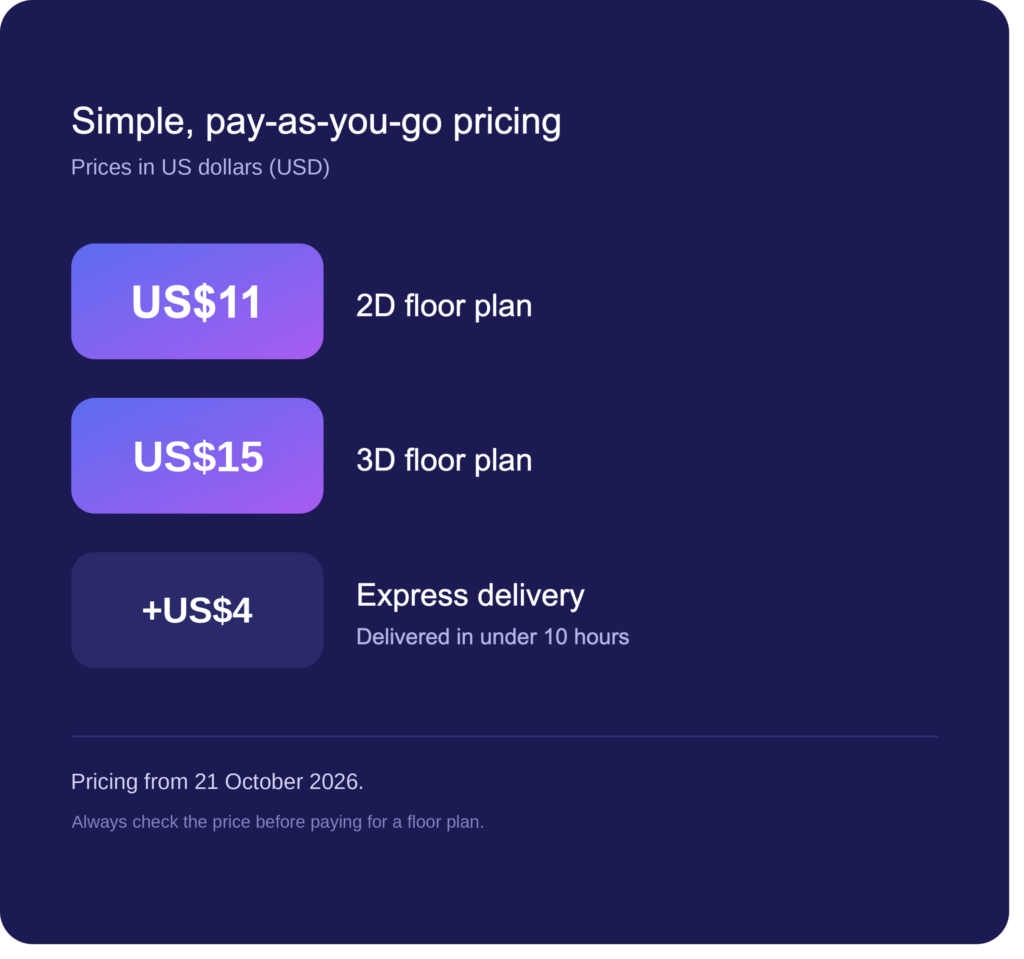
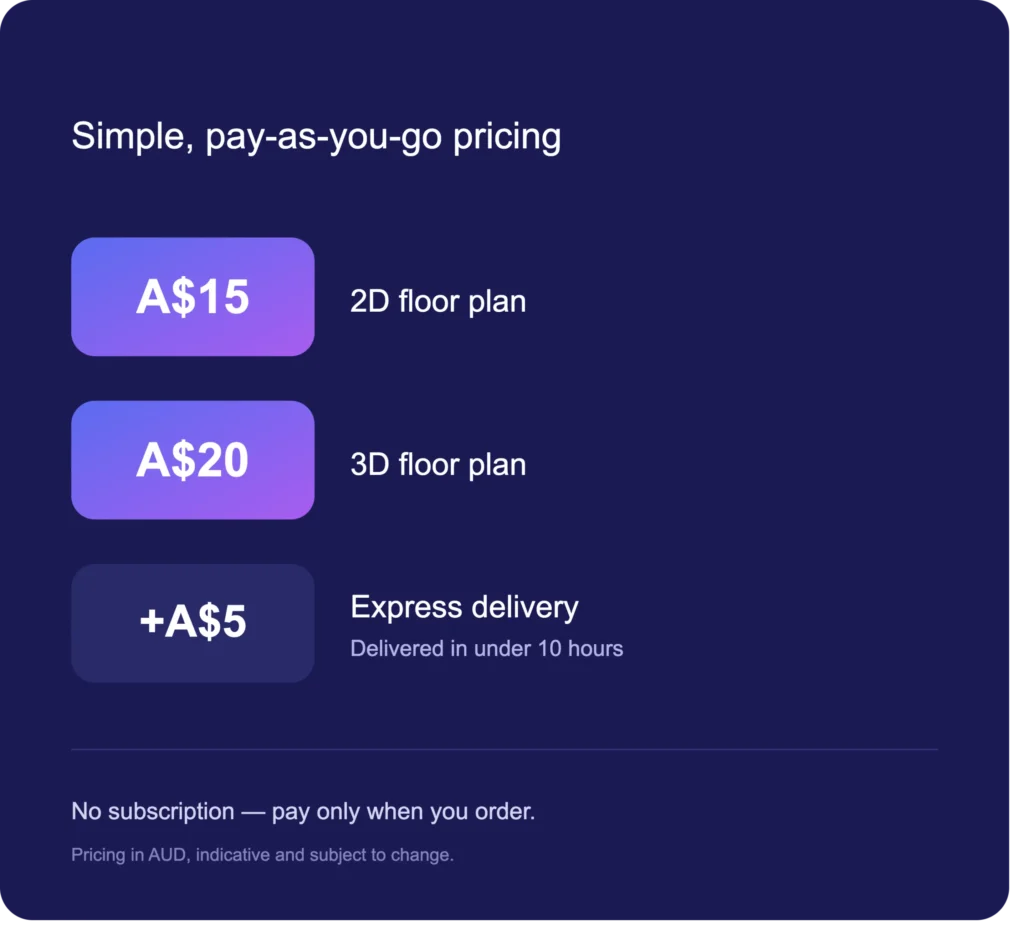
You pay only when you produce a floor plan. Roomio charges US$11 / A$15 / £8 for a 2D plan and US$15 / A$20 / £10 for a 3D plan, and that is a fixed price with all customisation included. Every order includes custom branding, total area calculations, fixtures, a site plan when the exterior is scanned, and exports in PNG, JPG, SVG and PDF. You can also order black and white, coloured, site plan and 3D versions of the same property in a single order.
There is no subscription, no monthly minimum and no add-on fees. At 5 plans a month your total is US$55 / A$75 / £40. At 10 plans it is US$110 / A$150 / £80. If you have a quiet month, you pay nothing.
Roomio pricing as at 19 August 2026.
Subscription
You pay a recurring fee regardless of how many plans you create. RoomScan Pro, for example, requires a subscription before you can export your own scans. Magicplan sells monthly project allocations with per-project charges above them.
Subscriptions can be cost-effective at high, consistent volume. But most solo agents and small photography teams don’t sustain that volume every month. Every quiet month, you are still paying for plans you never produced.
The break-even question
The honest comparison is not subscription cost against per-plan cost. It is subscription cost plus your finishing time, against per-plan cost with no finishing time. A cheap subscription that hands you a raw scan still leaves you doing the work that makes the plan usable.
Decision Framework: When to Use Free vs Paid
Use a free tool when you are creating floor plans for personal use with no deadline pressure, or you are testing whether floor plans add value to your listings before committing budget, and you don’t mind lower quality output for internal reference.
Use a pay-per-plan service when you need professional, branded floor plans for client-facing listings, your volume varies month to month, you want to minimise post-processing, or you need to pass the cost through to clients as a clear line item.
Use a subscription when you consistently produce high volume every month with no seasonal variation, you need features beyond floor plans, or you are part of a larger team sharing one licence.
The Bottom Line: Free Isn’t Always Cheaper
Free floor plan apps have their place. For personal projects, experimentation and occasional use where quality isn’t critical, they do the job. But for real estate professionals who need consistent, branded, listing-ready floor plans, the time cost of free tools typically exceeds the dollar cost of a paid alternative.
At US$11 / A$15 / £8 per professionally drafted 2D floor plan, Roomio removes the post-processing burden entirely. You scan during your photo shoot, submit the order, and receive a polished, branded floor plan within 12 to 24 hours. No formatting, no cleanup, no watermarks, no subscription.
Your first floor plan is free, so you can test the whole workflow on a real listing before spending anything.
The best floor plan tool isn’t the cheapest one. It is the one that gets you back to the work that actually generates revenue.
Stop spending time on floor plan formatting. Try Roomio Free. First plan free. US$11 / A$15 / £8 per plan. No subscription. Professionally drafted.
Frequently Asked Questions
Are free floor plan apps good enough for real estate listings?
Free floor plan apps are useful for testing and personal projects, but they typically restrict export quality, watermark output or limit project counts. For client-facing listings where quality and branding matter, a paid floor plan app or pay-per-plan service produces significantly better results.
What is the best free floor plan app in 2026?
For drawing floor plans manually, Planner 5D offers a strong free tier with measured 2D and 3D views. For scanning a real property, Magicplan’s free tier lets you capture two projects in total. For a fully free desktop tool, Sweet Home 3D has no usage limits but requires manual drawing.
How much does a paid floor plan app cost?
Pricing varies widely by model. Pay-per-plan services like Roomio charge US$11 / A$15 / £8 per 2D floor plan with no subscription. Subscription tools charge monthly or annually regardless of how many plans you produce. The right model depends on your volume and how consistent it is.
Is it faster to use a free or paid floor plan tool?
A drafting service is faster in the way that matters, which is your own active time. Manual drawing tools require you to measure and draw every room. Self-service scanning apps remove that but leave you formatting each plan. With Roomio you scan a 4 bedroom home in under 5 minutes, submit, and the drafting is handled for you.
Can I use a free floor plan app and still add my branding?
Most free floor plan apps don’t include branding options. Custom logos, colours and disclaimers are typically reserved for paid tiers. Roomio includes custom branding with every plan at no extra cost.